
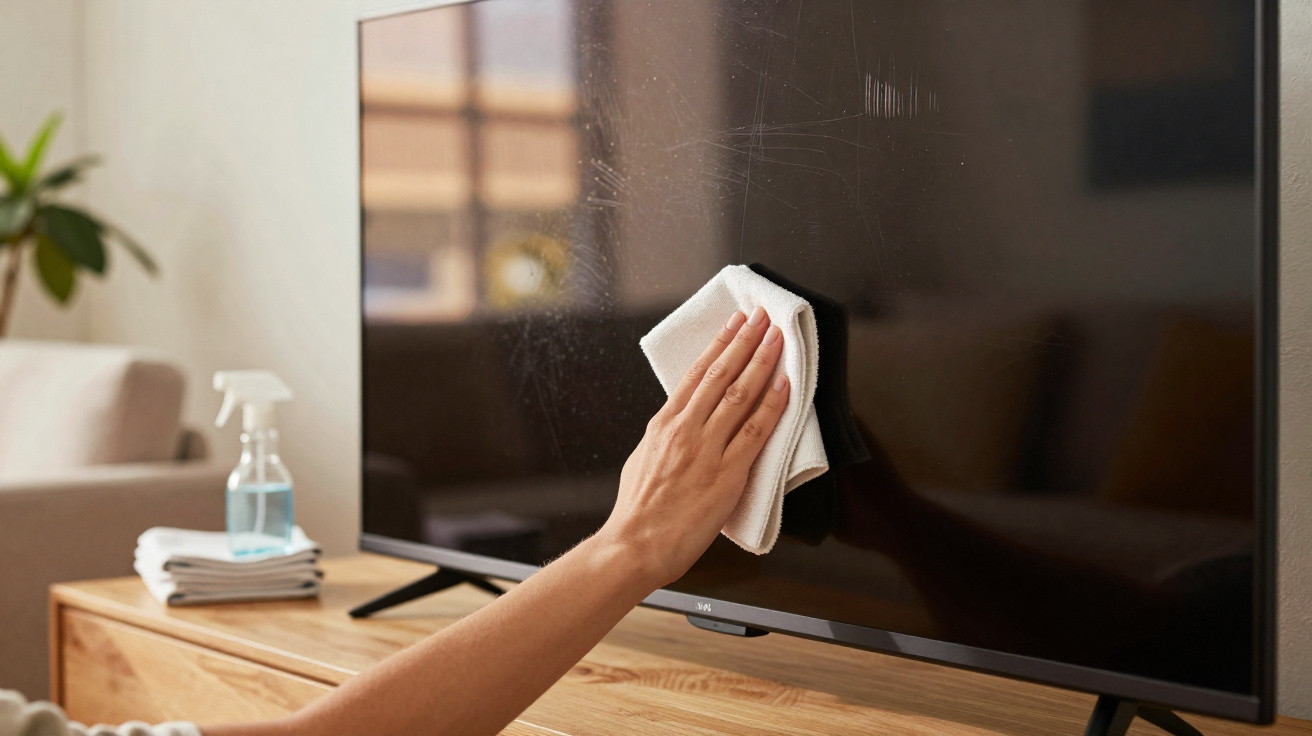
The room is still. The film you’ve been looking forward to all week finally starts loading… and then you spot it: smears, streaks, oily fingerprints right across the centre of the TV. All at once, the picture seems slightly muted and tired - as though you’re watching through a faint mist.
You angle your head, drag the sleeve of your hoodie across the glass, then squint from the sofa. No luck. The more you rub, the bigger the pale halo of marks becomes. You can tell the image is crisp underneath, yet the screen looks as if it’s borrowed someone else’s spectacles.
That’s usually when people reach for whatever’s closest: kitchen roll, window spray, an old T-shirt. And that’s exactly how plenty of modern screens get quietly damaged - in well under 30 seconds.
The good news is: you can clear that haze properly.
The hidden enemy on your TV screen
Most of us assume a TV screen is simply “dusty”. In reality, what you’re seeing is often a blend of finger grease, tiny cooking splashes you never noticed, fine lint from fabrics, and even residue from scented candles that gradually settles over time. Together, they create a thin, patchy layer that scatters light and makes deep blacks drift towards grey.
In bright scenes, it can be easy to miss. But when a film shifts into a darker mood, every streak seems to catch the light. As the backlight tries to push through that film, the image loses depth and starts to look flatter - until an expensive 4K panel can resemble a tired laptop display from 2010.
That isn’t “wear and tear”. It’s accumulation.
Recently, at a friend’s flat, we did a quick test. He’d been saying his two-year-old OLED had already “lost its wow factor”. Compared side by side with his older set in the bedroom, the difference did look minimal: similarly washed-out blacks and the same lack of richness.
Then we turned the living-room TV off and switched on a floor lamp beside it. Under the light, the screen looked like evidence under inspection: streaks left behind from earlier wipes, dull grey areas where dust had bonded with dried spray, and clusters of fingerprints at child height. You could practically trace where everyone usually stands.
We cleaned only half the display, carefully. No picture settings changed, no hidden service menu. When the TV came back on and we played a nature documentary, the contrast between the two halves was startling. The “clean” side looked deeper and darker - almost as if the panel had been upgraded in secret. He kept blinking, as though his eyes couldn’t quite persuade his brain.
Nothing mystical happened. It was pure optics. Modern flat panels depend on extremely thin anti-reflective and anti-glare coatings to manage how light reflects off the surface and reaches your eyes. An oily film, a water mark, or dried cleaner residue turns that precisely engineered layer into a messy diffuser.
The result is predictable: light spreads, colours lose impact, and contrast falls apart. And if you wipe with a rough cloth or aggressive chemicals, you’re not only lifting grime - you may scratch the surface or partially strip the coating, especially around the edges where people tend to press harder. That’s when permanent “cloudy” patches appear, or sections that never look properly clean again.
The encouraging flip side: if you treat the screen the way you’d treat a camera lens, you can restore the image quality it was built to show. That “like-new” feeling often has less to do with pixels and more to do with what’s sitting on top of them.
The quick, safe method that actually works
Approach this as a simple two-step routine: dry first, then barely damp. Start by switching the TV off and letting it cool for at least ten minutes. A cool, dark screen makes marks easier to see and reduces the chance of moisture drying too quickly.
Using a clean, soft microfibre cloth - the sort made for camera lenses or spectacles - gently pass over the entire screen in broad, horizontal strokes.
Avoid pressure. Let the cloth lift loose dust and hairs on its own. Refold it regularly so you’re always using a fresh area. This dry pass removes gritty particles that could scratch if you went in with moisture first. It isn’t exciting, but it’s your protection.
Next comes the real reset: take a second microfibre cloth and lightly dampen one corner with distilled water or a dedicated screen-cleaning solution. It should be slightly moist, not wet. Wipe in straight, slow lines from top to bottom, staying on the screen surface and away from any venting in the frame.
Here’s where people commonly go wrong. They grab household products - glass cleaner, kitchen sprays, or multi-surface “shine” formulas. Many contain alcohol, ammonia, or other solvents that can damage coatings or leave rainbow-like residue. Once the coating is harmed, you can’t restore it.
A gentle TV-safe cleaner or plain distilled water is usually all you need. Tap water can leave mineral spotting - especially in hard-water areas - so it’s best avoided on dark, glossy panels. Always spray the cloth, never the screen, and keep any moisture well away from the lower edge where it can seep inside.
If you come across a stubborn greasy patch, don’t attack it in circles like you’re scrubbing a pan. Instead, use the lightly damp section of the cloth and make several gentle passes, allowing moisture and time to loosen it.
And realistically, very few people carry out a “proper” screen clean every week. Life is busy, and the TV still works even when it’s wearing a film of fingerprints. That’s fine. What matters is steering clear of the small, tempting shortcuts that slowly wreck screens.
If children love pointing at cartoons, keep a dedicated “TV cloth” folded beside the remote so a quick wipe becomes a habit before film night rather than a full chore. If you smoke, cook frequently, or burn candles near the screen, aim for a more thorough clean about once a month. Small, consistent habits beat a massive effort twice a year.
A home-cinema technician I spoke to put it perfectly:
“I’ve seen people spend $1,500 on a TV and then destroy the coating with a $3 bottle of window cleaner. The pixels aren’t the problem. The wipe is.”
A compact checklist to leave by the TV unit:
- Use only microfibre cloths - no paper, no T-shirts.
- Switch the TV off and allow it to cool before cleaning.
- Begin dry to lift dust, then move to a barely damp cloth.
- Use distilled water or a screen-safe cleaner only.
- Wipe in straight lines, and never pour or spray directly onto the screen.
A cleaner screen, a different way of watching
There’s a quiet satisfaction in switching the TV back on after you’ve cleaned it properly. Blacks regain depth. Skin tones look more lifelike. Subtle shadows in a drama scene suddenly have structure again. You haven’t upgraded anything, yet it honestly feels like a new screen.
When the picture is clearer, people often find themselves nudging the brightness down slightly because there’s no longer a grimy veil to blast through. In a dim room, reflections appear softer and more controlled - particularly on sets with decent anti-glare coatings. Your eyes have less work to do, and it’s easier to settle into what you’re watching.
Over a long football night or a binge of a new programme, that improvement compounds. The image stops being merely “good enough” and starts looking deliberately crafted again. Much of that day-one wow factor was really clarity and contrast - and you’ve just taken them back.
Most of us have had friends round when someone casually says, “Wow, your TV looks amazing, what model is that?” and you feel a small, unexpected pride. Cleaning the screen can bring that moment back without spending anything. It’s also a subtle reminder that the glowing rectangle in the living room isn’t only background noise.
In some ways, wiping the panel is like cleaning a window: the view sharpens, and the whole room feels different. You may notice colour grading in a favourite film that you’d never picked up before. You might revisit an older series that once looked flat and find it feels almost remastered.
And if the screen is shared - with children, flatmates, or a partner - it can even turn into a tiny pre-movie ritual. Lights down, snacks ready, a careful pass with the microfibre cloth, and the unspoken signal: what we’re about to watch deserves a clean canvas.
| Key point | Detail | Benefit for the reader |
|---|---|---|
| Clean dry first | Soft microfibre, TV switched off, broad sweeps to lift dust | Prevents irreversible micro-scratches from the very first wipe |
| Dampen without soaking | Distilled water or a screen-specific product, applied to the cloth not the TV | Restores sharpness without streaks or coating damage |
| Simple, regular routines | Quick clean before big viewing sessions, deeper clean monthly | Keeps the picture “like new” without spending ages on it |
FAQ:
Can I use regular glass cleaner on my TV? It’s best not to. Many glass cleaners include alcohol or ammonia, which can attack the delicate anti-reflective coating on modern displays and leave permanent cloudy patches.
What kind of cloth is safest for cleaning a TV? Choose a clean, good-quality microfibre cloth - the type made for camera lenses or spectacles. Avoid kitchen roll, tissues, and cotton T-shirts, which can scratch the surface or leave fibres behind.
How often should I clean my TV screen? Ideally, dust lightly with a dry microfibre cloth once a week, and do a more thorough barely damp wipe every few weeks or about once a month, depending on how much dust and grease builds up.
Is distilled water really necessary? Distilled water helps prevent mineral spots and streaking, especially on dark, glossy screens. If your tap water is very soft and you wring the cloth almost dry, it may be fine - but distilled water is the safer option.
What should I do if I already used the wrong cleaner? If you’re seeing rainbow marks or cloudy areas that don’t disappear after gentle cleaning, the coating may be damaged. Stop using harsh products straight away and contact the manufacturer or a repair specialist for guidance.


Comments
No comments yet. Be the first to comment!
Leave a Comment