
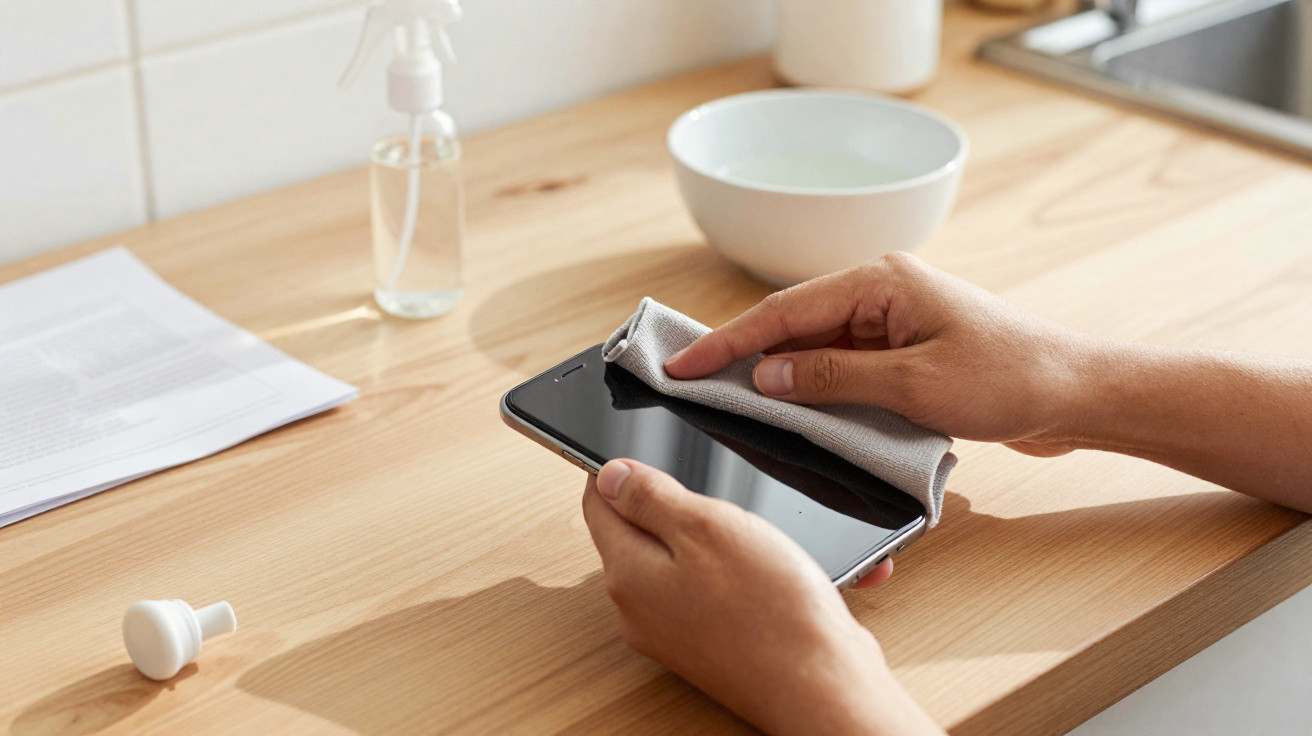
A quick wipe, a spray grabbed from the cleaning cupboard, a pack of damp household wipes: those familiar habits can, over time, leave a smartphone display dull, smeared and more prone to scratching. The damage creeps in quietly, often seeming invisible at first - and many people only notice once it is already too late.
The everyday cleaning habit that quietly destroys your display
Around the home, there are plenty of products meant for windows, sinks or door handles - not for a smartphone. Yet they still end up on screens. The issue is that modern phone displays have an ultra-thin chemical protective layer. It helps fingerprints slide off more easily and gives the glass that smooth feel. Harsh chemicals are exactly what can break that layer down.
Among the hidden “display killers” are, in particular:
- Antibacterial wipes, especially versions containing chlorine or strong disinfectants
- Glass and window cleaners with ammonia or solvents
- Household vinegar or vinegar-based cleaners, even when marketed as “natural”
They all share one thing: their formulas are designed for hard-wearing surfaces such as windows, tiles or metal - not for the delicate construction of a smartphone display.
Many cleaning products remove not only grime, but also the protective display coating - slowly, but permanently.
Why your phone suddenly looks dull and scratches more easily
This kind of damage rarely appears after a single clean. Chemical ingredients chip away at the oil-repellent layer bit by bit - each time you wipe, a little more goes. At first the screen may simply feel “different”, but later the signs become obvious:
- The surface feels rougher or “tacky”.
- Fingerprints build up faster and show more strongly.
- The display starts to look hazy, slightly matte or blotchy.
- Fine scratches appear more often because the protective layer is gone.
Cleaners containing solvents, chlorine, or strongly acidic/alkaline components can gradually strip that coating. In day-to-day use, the display can look less crisp, contrast loses its punch, and the device feels more “worn” overall - even if, technically, it is still performing perfectly well.
These products should never touch a smartphone display
If you want your phone to last, it is best to permanently remove a few household favourites from your cleaning routine. Particularly risky are:
- Antibacterial wipes with chlorine or strong disinfectant additives
Designed for bathrooms or door handles, but far too harsh for the fine layers of a display. They can attack the coating and leave the glass looking dull in the long run. - Glass and window cleaner
Effective at shifting dirt, nicotine residue and limescale from windows - but on a phone it can, in the worst case, dissolve parts of the surface treatment. - Vinegar or vinegar cleaner
A household classic and great against limescale, but too aggressive for sensitive electronic surfaces. - Universal household cleaning sprays
Even when the label says “gentle” or “mild”, they are not tested for electronics and often contain surfactants and fragrances that can leave residue.
There are mechanical risks as well: kitchen roll, tissues, or any rough cloth can create micro-scratches through their texture - especially if dust or sand particles are involved.
The safe basic rule: never spray directly onto the phone
A near-classic mistake is spraying cleaner straight onto the display and then wiping it off with a cloth. Moisture can work its way into speaker grilles, the microphone, the charging port or buttons. Even if nothing fails immediately, the risk of internal corrosion rises.
Care products should always go on the cloth first - never directly on the device.
A second rule matters just as much: use only soft, lint-free materials. Microfibre cloths - like the kind used for glasses or camera lenses - are ideal. They lift grease and dirt without scouring.
The recommended cleaning formula for a safe display
Instead of relying on aggressive household cleaners, a dry microfibre cloth is often enough to buff away fingerprints. For a more thorough clean, experts recommend a simple two-ingredient mix:
- Water, ideally distilled
- Isopropyl alcohol (70%)
Combine both in a 1:1 ratio in a small spray bottle or a clean bottle. Distilled water helps prevent limescale marks, while isopropyl alcohol cuts through grease and evaporates quickly.
| Component | Purpose |
|---|---|
| Distilled water | Loosens dirt, leaves no limescale edges |
| Isopropyl alcohol 70% | Degreases, has a disinfecting effect, dries quickly |
How to use the mixture correctly
The routine is straightforward:
- Switch the smartphone off and disconnect it from the charging cable.
- Lightly dampen the microfibre cloth with a little solution - do not soak it.
- Clean the display using gentle, circular motions.
- Buff with a dry part of the cloth.
The amount you use is crucial: the cloth should be only slightly damp. Avoid drips and wetness around edges and openings.
Mistakes that really come back to bite over time
Some habits damage a display far more than others. Cutting them out greatly improves your chances of keeping a clear, bright screen for longer:
- Cleaning straight after a shower in a steamy bathroom, when condensation forms
- Using kitchen roll or tissues that leave crumbs and fibres
- A “quick wipe” with a sleeve, scarf or jeans
- Regular disinfection with strong surface disinfectants
A sleeve may feel convenient, but it can pick up grit or dust that then acts like sandpaper on the surface. Add pressure and you get micro-scratches that cannot be polished away.
How often should you actually clean your phone?
If you commute daily, travel on buses and trains, or use your smartphone in both the kitchen and the office, you can touch the display hundreds of times a day. Even so, it does not need constant deep-cleaning.
- Daily care: a quick dry wipe with a microfibre cloth
- Once or twice a week: a damp clean with the water–isopropyl mix
- After illness or heavy soiling: wipe a little more thoroughly, especially the back and edges
A high-quality tempered-glass screen protector adds another layer of protection for the original surface. If needed, you can replace the protector before the real display takes the damage.
Why manufacturers give such strict care instructions
Many smartphone brands spell out exactly which cleaners are off-limits in their support documentation. The reason is simple: the protective layers on displays are expensive to produce and technically complex. Once they are worn away, the device looks cheaper and older - even if the processor could keep going for years.
Moisture is another factor. Tiny amounts of liquid entering ports or openings can corrode solder points and contacts. The problem often shows up months later - for example, when the charging cable starts to wobble or the speaker suddenly sounds muffled.
Practical add-on: what else has proven useful for phone care
Alongside cleaning properly, it helps to think about how you use and store your smartphone. A basic screen protector and a simple case already reduce many everyday risks. Keeping the phone out of the kitchen as much as possible also protects it from cooking grease in the air and splashes. In a pocket or rucksack, giving it a fixed place - away from keys and coins - helps prevent scratches.
How you leave it overnight can matter too. If your phone is lying loose on the bedside table, a casually placed ring or a pair of glasses can leave a fine mark the next time something shifts. A soft cloth underneath, or a dedicated spot for the phone, cuts down these accidental scratches.
If you follow these steps, you do not need heavily advertised specialist cleaners. A microfibre cloth, the simple water–isopropyl mix, and a few mindful habits are enough to keep your display clearer, smoother and more pleasant to use for much longer.
Comments
No comments yet. Be the first to comment!
Leave a Comment