
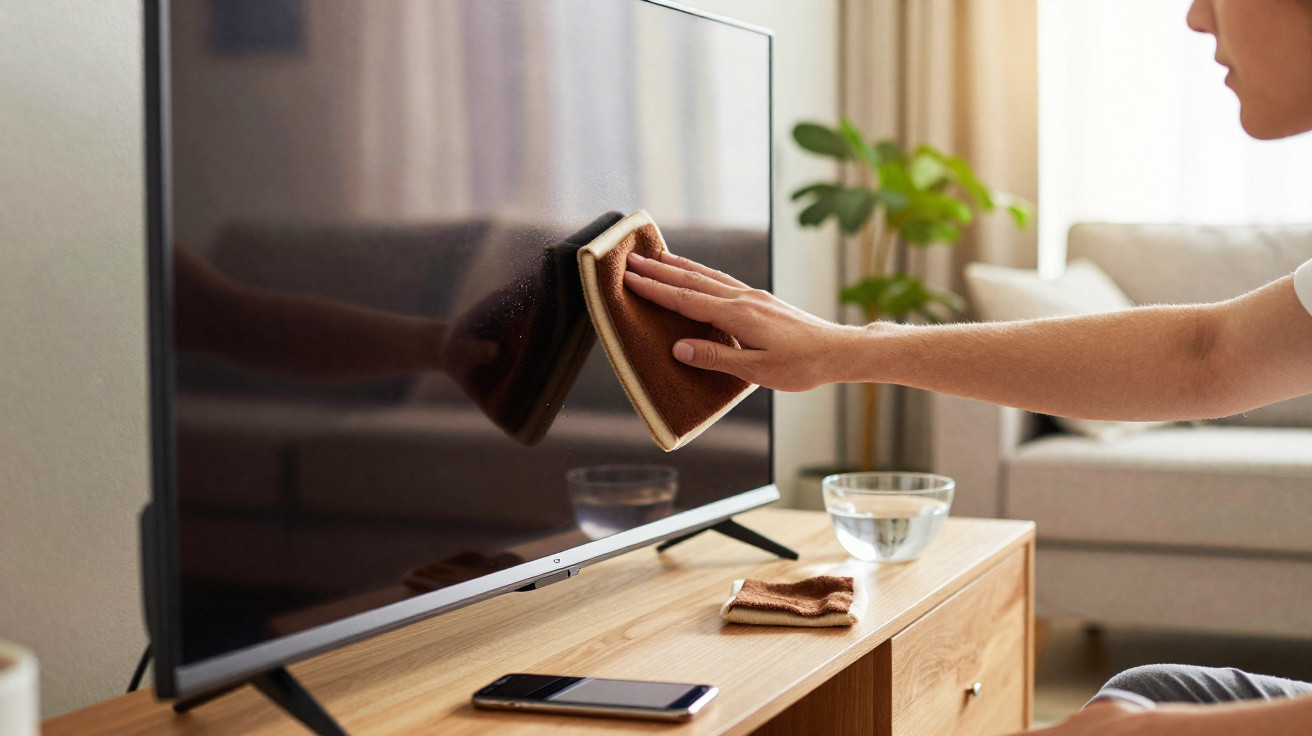
Whether it’s the television in the living room, a monitor in your home office or a smartphone that’s used all day, every day: greasy fingerprints and layers of dust build up everywhere. Many people then reach for glass cleaner, kitchen roll or harsh specialist sprays. That’s exactly what can attack coatings and, over time, damage expensive tech. A humble item from the kitchen can do the same job - for just a few cents and with far less risk.
Why screens start looking dull so quickly
Leave the TV alone for a few days and you’ll recognise the result: the surface looks grey, flat and slightly milky. There’s nothing mysterious about it - it’s basic physics. Modern displays can hold a mild electrical charge, which attracts tiny dust particles floating in the air. The drier the air indoors (for example in winter with central heating on), the more the dust seems to cling to the panel.
Fingerprints add to the problem. Every touch leaves behind a thin layer of skin oils mixed with small dirt particles. Touchscreens on smartphones and tablets are especially affected because they’re constantly handled. Together, dust and grease form a smear film that scatters light and reduces contrast. Trying to wipe it away often means applying pressure - and LCD, LED and OLED panels really don’t respond well to that.
"Too much pressure and harsh cleaners are among the most common reasons for dull patches and fine scratches on expensive screens."
That’s why many manufacturers explicitly warn in their manuals against alcohol, ammonia and standard household cleaners. Some glass cleaners also contain additives that can gradually break down delicate anti-reflective coatings. Once that top layer is damaged, it can’t be repaired. The picture can then look permanently blotchy or unevenly bright.
The unassuming kitchen product that protects screens
The answer is surprisingly often in the kitchen cupboard: a simple paper coffee filter. Unbleached versions are particularly good because they’re evenly made with a fine structure. It feels smooth, but the surface is actually micro-fibrous - and that texture helps lift dust and grease rather than just smearing it around.
Unlike kitchen roll or facial tissues, filter paper doesn’t contain the coarser wood fibres that can create tiny scratches over time. Even if you barely press down, those fibres can scuff protective coatings. Coffee filters, by contrast, glide gently over the surface and don’t leave lint behind.
Another advantage is that the paper is largely chemically neutral. There are no fragrances, no lotions and no surfactants - all common ingredients in wet wipes or glass cleaners, and all things that can react with screen coatings.
Cost comparison: filters instead of pricey specialist cleaners
Financially, the filter approach also makes sense:
- Coffee filters: usually under 0,02 euro each
- Specialist display wet wipes: around 0,10 to 0,30 euro per wipe
- Specialist screen sprays: often 8 to 15 euro per bottle
If you use a fresh filter each time and clean your TV, monitor and smartphone with it, your yearly spend is often under one euro. Many people, meanwhile, repeatedly buy new packs of wipes or sprays that run out faster than expected.
"Coffee filter paper lets you clean displays gently - and a year’s supply costs less than a simple snack."
How to clean your TV, monitor and smartphone properly
For this trick to work, technique matters. You can do it in a few simple steps:
- Switch the device off and let it cool down; ideally unplug it as well.
- Wash your hands and remove jewellery such as rings or chunky bracelets.
- Take a fresh, dry coffee filter and fold it flat.
- With very light pressure, move over the surface in broad strokes - either in circles or from top to bottom.
- For stubborn grease marks, optionally dampen a microfibre cloth very slightly with distilled water, gently loosen the spot, then finish with the dry coffee filter.
Afterwards, the screen should look clear, streak-free and free of dust. The key is not to be tempted to rub “just a bit harder”. If a mark won’t shift, it’s better to wipe twice lightly than to press once with force.
Common mistakes that ruin screens over time
A lot of damage doesn’t happen instantly - it builds up gradually through the wrong habits. It’s best to stop doing the following:
- Don’t spray cleaner directly onto the screen - liquid can run down the edges into the housing.
- Don’t use kitchen roll, tissues or rough cloths - they often contain hard fibres.
- Don’t dampen filter paper - moisture can roughen the paper and leave lint.
- Don’t reuse the same filter - trapped dust can act like an abrasive on the next pass.
How often should you actually clean screens?
Some people clean far too rarely; others do it too often and, above all, too aggressively. A sensible everyday routine looks like this:
| Device | Recommended cleaning |
|---|---|
| TV in the living room | Dust with a dry coffee filter every 2–4 weeks |
| Monitor in the home office | Light wipe weekly, depending on dust levels |
| Smartphone | Several times a week; with heavy use, a quick wipe daily |
| Tablet / in-car touchscreen | As needed, usually every 1–2 weeks |
If you smoke indoors, cook in an open-plan space or have lots of pets, you’ll need to clean more frequently. In those environments, extra greasy particles and fine grime settle on surfaces as well.
What to do with heavily soiled displays
Sometimes dry wiping isn’t enough - for example with dried splashes, nicotine film or screens that haven’t been cleaned in a long time. In those cases, a two-stage approach helps:
- Start with a microfibre cloth that’s only very lightly dampened (ideally using distilled water).
- Use the minimum moisture needed so nothing drips or seeps into the casing.
- After the damp clean, immediately go over it with a dry coffee filter to lift remaining moisture and prevent streaks.
It’s best to avoid home-made mixes using alcohol, vinegar or washing-up liquid on sensitive displays. What works well on windows or tiles can leave permanent marks on televisions and laptops.
Background: why surfaces react so sensitively
The visible outer layer of a modern display is built up from multiple layers. Above the pixels there’s usually a thin sheet of plastic or glass, plus several specialist coatings - for example to reduce reflections, improve colour reproduction or resist fingerprints. These top layers are often only a few micrometres thick.
Strong cleaners can dissolve elements within those layers or make them porous. Micro-scratches don’t only come from one rough cleaning session; they can also result from many small, repeated rubs with unsuitable materials. Over time the image can look “washed out” even though the underlying technology still works perfectly.
Once you picture that layered construction, it becomes clear why a soft, dry material such as coffee filter paper is a better match than some “professional” sprays from electronics shops.
Practical extra: hygiene and odour
One question remains: what about germs on a smartphone or tablet? Filter paper improves appearance but it doesn’t replace hygienic disinfection. If you often take your phone into the loo or travel a lot on buses and trains, you may occasionally want specialist disinfectant wipes that are suitable for displays - but do check the device manufacturer’s guidance.
For day-to-day use, dry cleaning is usually enough. Many fingerprints disappear, and with them some of the bacteria that cling to the greasy film. If you also care about a pleasant smell, it’s better not to use fragranced sprays directly on the device; at most, use them in the surrounding area, for example while vacuuming or mopping the room.
All in all, this kitchen trick shows you don’t need expensive specialist products or questionable online “hacks” to keep your TV, monitor and smartphone clean. In many cases, reaching for the coffee filters is enough - and it protects both your wallet and your tech.
Comments
No comments yet. Be the first to comment!
Leave a Comment